Pixar Style and Cinematic AI Image Prompts (With Examples)

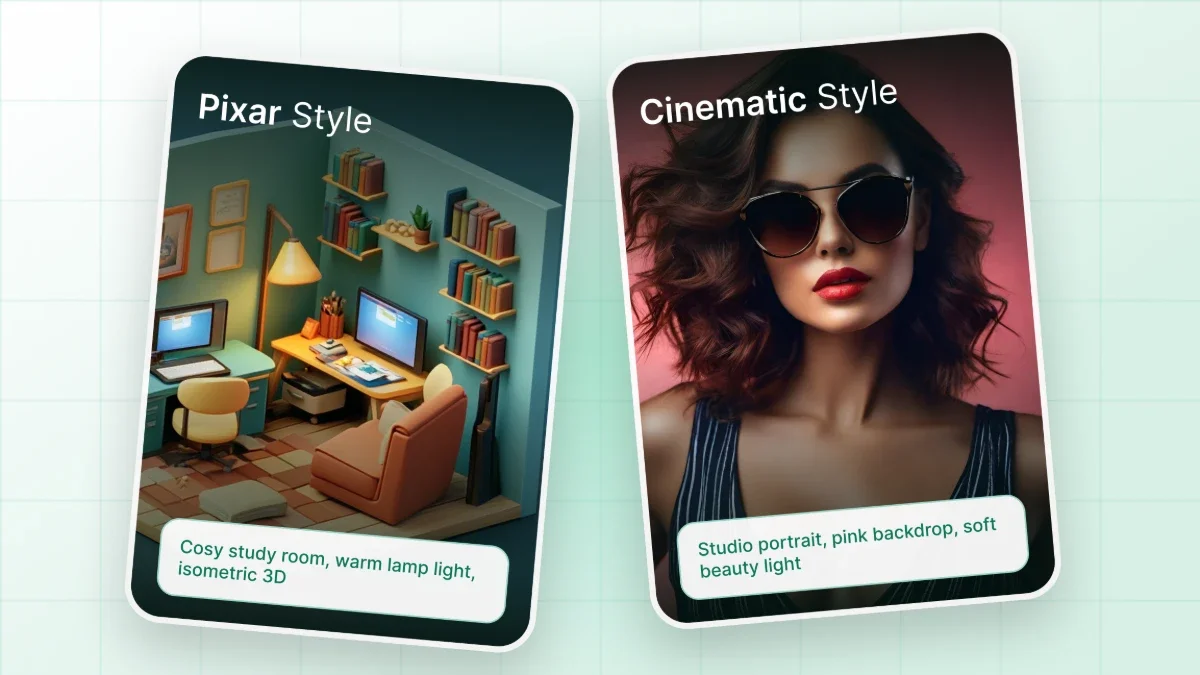
A Pixar style AI prompt describes the look of 3D animated films: rounded shapes, oversized expressive eyes, soft bounce lighting and saturated color. A cinematic prompt adds film language such as shot type, lens, lighting setup and color grade. Combining both produces AI images that read like frames from an animated movie.

Date October 7, 2026 · Grace Mitchell

What Defines a Pixar Style AI Image

A Pixar style AI image is defined by stylized 3D characters with exaggerated, appealing proportions, rendered with soft light and simplified surfaces. Heads and eyes are larger than real anatomy allows, noses and hands are simplified, and every shape leans toward round, readable silhouettes. Surfaces look tactile without being photoreal. Skin glows slightly where light passes through it, fabric shows gentle texture, and backgrounds stay detailed but never compete with the character.

Emotion carries the style as much as rendering does. Characters hold clear poses with expressive eyebrows and posture that tell the story in a single frame. Lighting is usually warm and motivated, coming from a window, a lamp or a sunset, with a soft rim light separating the character from the background.

Image models respond to these traits when they are named directly. Terms such as "3D animated feature film style", "stylized proportions", "subsurface scattering", "soft global illumination" and "rim light" consistently steer results toward the animated look. Each term describes something visible, and that matters more than any single reference name.

What Makes an AI Image Look Cinematic

An AI image looks cinematic when the prompt describes how a camera, a lens and a lighting crew would capture the scene. Ordinary prompts describe only what is in the frame. Cinematic prompts also describe how the frame is built. That includes the aspect ratio, the distance between camera and subject, depth of field and the direction and color of light.

Several elements do most of the work. A wide 2.39:1 frame immediately reads as film. Focal lengths like 35mm for environmental shots or 85mm for portraits control perspective and background blur. Volumetric light, haze and atmospheric depth add the layered quality of a set. Color grading terms such as "teal and orange", "muted desaturated tones" or "warm amber highlights" shape the mood the same way a colorist would.

Composition language completes the picture. Phrases like "low angle shot", "over the shoulder", "symmetrical framing" or "leading lines toward the subject" give the model a clear camera position. A good movie prompt reads less like a description of an object and more like a note from a director of photography.

The Structure of a Strong Movie Prompt

A strong movie prompt follows a consistent order: subject first, then action, setting, style, camera, lighting, color and format. Models weigh earlier words more heavily, so the most important element should come first. The table below breaks down each part with an example phrase.

Element What it controls Example phrase
Subject Who or what the image is about a small robot gardener with round glass eyes
Action and emotion Pose, expression and story gently watering a single sunflower, curious expression
Setting Location, time and environment rooftop garden at dusk above a quiet city
Style Rendering approach 3D animated feature film style, stylized proportions
Shot and lens Camera position and perspective low angle medium shot, 35mm lens, shallow depth of field
Lighting Direction, quality and color of light warm golden hour rim light, soft bounce fill
Color and grade Overall palette and mood saturated warm palette with gentle teal shadows
Format Frame shape and detail level wide 2.39:1 frame, high detail render

Not every model reads prompts the same way. Diffusion models such as Stable Diffusion XL respond well to comma separated descriptive phrases. Newer instruction following models handle full natural sentences. Writing the prompt as clear phrases in this order works reasonably well for both.

Pixar Style AI Prompts for Characters and Scenes

The prompts below use descriptive style language instead of studio or character names. Each one can be copied as is or adapted by swapping the subject and setting.

Idea Prompt
Curious child explorer A seven year old girl with a big yellow raincoat and oversized round eyes, kneeling to inspect a glowing mushroom in a misty forest, 3D animated feature film style, stylized proportions, soft volumetric morning light, shallow depth of field, warm saturated colors
Elderly inventor A cheerful elderly inventor with a white mustache and tiny round glasses, holding a handmade brass gadget in a cluttered workshop, 3D animated film style, warm lamp light with soft rim light, rich wood textures, medium close shot
Animal hero A small fluffy fox wearing a tiny backpack, standing on a mossy rock and looking at a distant mountain village, stylized 3D animation, golden hour light, soft fur detail, wide establishing shot
Everyday object character A friendly desk lamp character with expressive posture, peeking curiously at a sleeping cat on a bookshelf, 3D animated short film style, cozy evening light, soft shadows, warm palette
Family moment A father and son of Latin American descent baking bread together in a small sunny kitchen, flour on their faces, laughing, stylized 3D animated style, soft window light, warm pastel colors
Brand mascot A round, friendly cloud character with small arms and a big smile, floating over a city skyline, clean 3D animated style, bright soft lighting, simple background, centered composition
Fantasy creature A tiny dragon the size of a teacup, sneezing a small puff of sparkles in a library, 3D animated feature film style, dust motes in sunbeams, playful expression, shallow depth of field
Underwater scene A shy octopus character holding a seashell like a treasure, coral reef with bright fish, stylized 3D animation, caustic light patterns from the surface, vivid turquoise palette

Characters built this way can carry over into other formats. A mascot from these prompts can become the starting point for a brand mark with an AI logo designer. Repeating the same character description word for word across prompts helps keep its look consistent between images.

Cinematic AI Prompts for Film Stills and Posters

Cinematic prompts focus on camera, light and atmosphere. They work for realistic film stills, animated scenes and posters for original stories.

Idea Prompt
Neon city chase A lone courier on a motorbike speeding through a rain soaked neon city at night, reflections on wet asphalt, low angle tracking shot, 35mm lens, teal and magenta color grade, cinematic 2.39:1 frame, light film grain
Desert epic A traveler in a long cloak walking across vast sand dunes at sunrise, tiny figure in a huge landscape, extreme wide shot, volumetric haze, warm amber and dusty blue palette, epic film still
Quiet drama A woman sitting alone at a diner counter at 2am, steam rising from a coffee cup, soft fluorescent light mixed with red neon from the window, medium shot, 50mm lens, muted desaturated tones
Mystery forest A detective holding a lantern in a foggy pine forest, beams of light cutting through mist, over the shoulder shot, cold blue grade with a single warm light source, suspenseful mood
Space station An astronaut floating beside a window overlooking Earth, reflection of the planet on the visor, close up portrait, 85mm lens, soft blue rim light, quiet cinematic atmosphere
Original movie poster Movie poster for an original adventure film called "The Last Lighthouse", a young keeper holding a lantern on a cliff during a storm, dramatic low angle, towering waves, bold title space at the top, high contrast lighting
Animated film still A small village festival at night with floating paper lanterns, children running between stalls, 3D animated feature film style, cinematic wide shot, warm lantern glow against deep blue sky
Period piece A pianist performing in a grand 1920s concert hall, dust in spotlight beams, symmetrical framing, warm sepia grade, fine film grain, wide shot from the back of the hall

Poster prompts work best with invented titles and characters. Text rendering varies by model, so short titles produce cleaner results than long taglines.

Describing a Style Without Copying Characters or Studio IP

The safest way to get a Pixar style look is to describe the visual traits rather than name a studio, film or character. Studio names act as a shortcut, but they also pull the model toward existing characters and scenes, which creates copyright and trademark risk. Many image generators refuse prompts that name protected characters or ask for recreations of specific film frames.

Descriptive language produces more original and more controllable results. "Stylized 3D animated character with oversized eyes and soft lighting" leaves room for a new design. A character name only invites an imitation. The same applies to cinematic work: lens, lighting and grade terms recreate a filmic feel without referencing any particular movie.

For images used in marketing, products or publications, originality matters even more. Characters, costumes, logos and settings should be new creations, and the terms of the image tool should be checked before commercial use.

How to Fix Common Problems in Animated and Cinematic Renders

Most weak results trace back to one missing or vague element in the prompt. The table below covers the issues that appear most often and the prompt changes that usually fix them.

Problem Likely cause Prompt fix
Character looks plastic or toy like No material or lighting detail Add "soft subsurface scattering", "subtle skin texture", "soft bounce light"
Result looks too realistic or uncanny Style term too weak or placed late Move "3D animated feature film style, stylized proportions" near the start
Image looks flat No light direction Add a light source and direction, such as "warm window light from the left, soft rim light"
Busy, cluttered composition Too many subjects or props Reduce to one subject and add "simple background" or "shallow depth of field"
Not cinematic enough No camera language Add shot type, focal length and "2.39:1 wide frame"
Scene is too dark Mood words without light sources Keep the mood but name a visible light, such as lanterns, neon or moonlight
Character changes between images Description rewritten each time Reuse the exact same character description and change only action and setting

Changing one element at a time makes it clear which word caused the improvement. Rewriting the whole prompt after each attempt hides what actually worked.

Creating Pixar Style and Cinematic Images in Chat & Ask AI

Chat & Ask AI generates images directly inside the conversation, so writing, refining and rendering a prompt happen in the same place. The AI image generator turns a text description into an image. Follow up messages adjust the result: warmer lighting, a lower camera angle or a different color grade can be requested in plain language without rebuilding the prompt from scratch.

The chat itself helps with prompt writing. A rough idea such as "a shy robot in a garden, animated movie feel" can be expanded by the language model into a structured prompt with subject, action, setting, style, lens, lighting and color. That structured version can then go straight to image generation. This step is especially useful for beginners who know the look they want but not the film terms that produce it.

Different image models handle styles differently, and Chat & Ask AI offers more than one. Nano Banana, developed by Google, follows detailed natural language instructions and suits edits and consistent characters. Stable Diffusion XL, developed by Stability AI, responds well to keyword style prompts and strong stylistic cues. Running the same movie prompt through both shows which rendering fits a specific project better.

Iteration stays organized because every version remains in the conversation history. A character created in one session can be revisited later with the same description, placed in new scenes and adjusted shot by shot. Images can be created on the web or in the Chat & Ask AI mobile app, and the same history appears on both.

Pixar style and cinematic AI image prompts work best when they describe visible traits: shapes, light, lens and color. Chat & Ask AI brings prompt writing, image generation and refinement into one conversation, so a rough idea can become a finished movie style scene step by step.

Turn Prompts Into Movie Scenes
FAQ

Frequently Asked Questions

What is a Pixar style AI prompt?

A Pixar style AI prompt is a text description that asks an image model for the look of 3D animated films. That means stylized proportions, large expressive eyes, soft lighting, rounded shapes and warm, saturated colors, described through visual traits.

How do I make AI images look like a Pixar movie?

Put "3D animated feature film style" and "stylized proportions" near the start of the prompt. Then add soft global illumination, a rim light, expressive emotion and a warm palette. Describing traits works better than naming a studio.

What is a movie prompt in AI image generation?

A movie prompt describes a scene the way a film crew would capture it. It covers the subject and action plus shot type, lens, lighting direction, color grade and aspect ratio, so the image reads like a frame from a film.

How do I make an AI image look cinematic?

Add camera language to the prompt. That includes a wide 2.39:1 frame, a focal length such as 35mm or 85mm, shallow depth of field, a motivated light source, atmospheric haze and a color grade such as teal and orange.

What aspect ratio looks most cinematic?

The 2.39:1 widescreen ratio reads most clearly as cinematic because it matches the format of many feature films. A 16:9 ratio also works for film stills, while posters usually use a vertical frame.

Can AI generate Pixar characters?

Many image generators block prompts that name protected characters, and recreating them raises copyright and trademark concerns. Describing the visual style and creating original characters produces safer results that are also easier to control.

Which camera terms work in AI image prompts?

Shot types like close up, medium shot and extreme wide shot work well. So do angles like low angle and over the shoulder, focal lengths like 35mm and 85mm, and terms such as shallow depth of field and film grain.

Can I use Pixar style AI images commercially?

Original images that only borrow general visual traits are lower risk than images that reference existing characters, logos or scenes. The terms of the image tool should be reviewed, and legal advice is sensible for important commercial uses.

Can Chat & Ask AI create Pixar style images?

Yes. Chat & Ask AI generates images from text inside the chat, including stylized 3D animated looks and cinematic scenes. Results can be refined with follow up messages that adjust lighting, camera angle or color.

Which image models does Chat & Ask AI use?

Chat & Ask AI offers multiple image models, including Nano Banana, developed by Google, and Stable Diffusion XL, developed by Stability AI. Each responds differently to prompts, so comparing them helps find the best fit for a style.

Can Chat & Ask AI help write image prompts?

Yes. A rough idea can be described in plain words, and the chat model expands it into a structured prompt with subject, setting, style, lens, lighting and color. That prompt can then be used for image generation right away.

Chat & Ask AI

AI CHAT, WRITING & PRODUCTIVITY PLATFORM

Chat & Ask AI is an AI platform that brings conversational chat, writing assistance, document analysis, and image generation into one subscription. You can access several leading AI models depending on the task, ask questions, draft content, review a PDF, or generate a visual within the same conversation. To experience how a multi-model workspace can streamline your unified daily workflow, you can create your workspace account today without adding extra tools to your routine, or learn more about Chat & Ask AI.

96% of users report increased efficiency and faster workflows after switching to Chat & Ask AI.